
Open Source Alternatives
  • Alternatives
  • Categories
    Categories by size1,324 projects
    • Developer Tools681
    • AI & Machine Learning552
    • Business & Productivity324
    • Web Development219
    • Security & Monitoring200
    • Communication & Collaboration171
    • IT Management166
    • Design & Creative148
    • DevOps & CI/CD143
    • LLMOps & AI Tooling142
    Browse all 21 categoriesCloud & Hosting, Product & Project Management and 9 more
  • Blog
  • Advertise
SearchNotion, Slack, password manager.../
Submit
Open Source Alternatives
  • Alternatives
    • Developer Tools681
    • AI & Machine Learning552
    • Business & Productivity324
    • Web Development219
    • Security & Monitoring200
    • Communication & Collaboration171
    • Browse all 21 categories
  • Blog
  • Advertise
Submit your project

New open source projects by email

The projects we add and every new guide. Free, unsubscribe any time.

Open Source Alternatives LogoOpen Source Alternatives

Handpicked Open Source Alternatives to Paid Softwares

Add Open Source Alternatives as a preferred source on Google

Product

  • Categories
  • Tag
  • Advertise

Resources

  • Blog
  • Collection
  • Submit

Company

  • Privacy Policy
  • Terms of Service
  • Refund Policy
  • Sitemap

Alternatives

  • Claude Code
  • Jira
  • Notion
  • Slack
  • Linear
  • Wispr Flow
  • All alternatives
© 2026 Open Source Alternatives. All rights reserved.
Open SourceAlternatives
Home/Categories/Business & Productivity/Taskwarrior
icon of Taskwarrior

Taskwarrior

Open source alternative to Microsoft To-Do

  • 6.2K stars
  • MIT
  • Active this week
  • Last commit 3 days ago

Last verified Nov 21, 2026

Manage tasks from the command line with GTD workflows, local data storage, and an MIT license.

Visit websiteGitHub6.2K stars
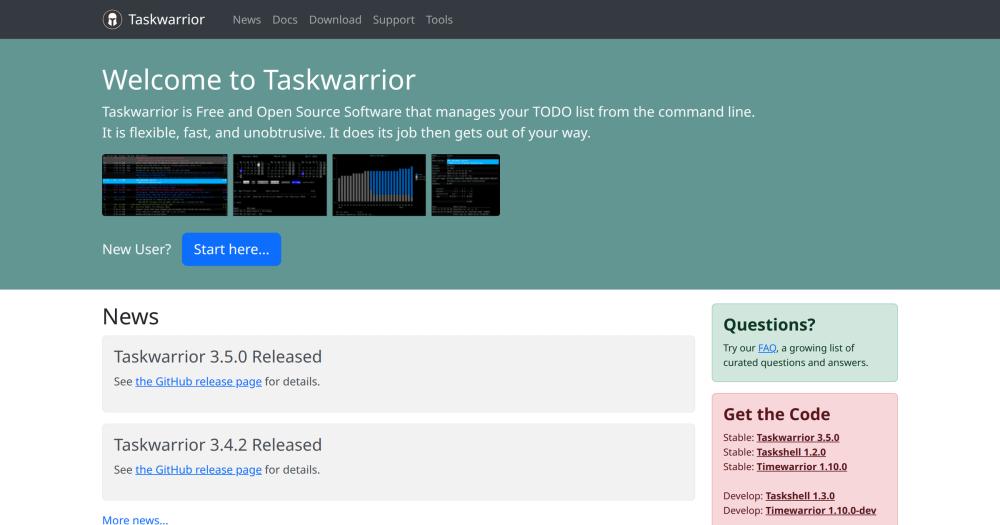
Image for Taskwarrior
TL;DR

Taskwarrior is an MIT-licensed command-line task manager built for developers and technical users who want local data storage and terminal-based task workflows. It stores tasks on your machine, processes commands instantly, and ships with a hook and extension system that integrates with calendar tools and sync backends. Available on Linux, macOS, and Windows via package manager; in development since 2006.

Read the full breakdownHide the full breakdownWho it is for, how it works, trade-offs, the quick start and the FAQ
who it's for

Who Taskwarrior is for#

Developers Managing Work Alongside Code

Developers who want to track tasks without switching windows can keep Taskwarrior running in a terminal split alongside their editor. The hook API can connect task actions to Git workflows or other development tooling.

Skip if:

If you need to share a task list with non-technical teammates or use a mobile-first workflow, a GUI tool will cover more of the team's surface area than a CLI-only task manager.

GTD Practitioners with Terminal Workflows

Users following a GTD system who want projects, contexts, priorities, and due dates in a queryable local store. Taskwarrior's filter syntax maps directly to GTD's review and next-action concepts, with reporting built in.

Skip if:

GTD practitioners who rely on a visual weekly review (boards, timelines, kanban) or who frequently capture tasks from a phone will find the CLI workflow a barrier rather than a benefit.

Privacy-Focused Users Avoiding Cloud Storage

Users who do not want their task list synced to third-party servers. Taskwarrior stores all data locally by default, requires no signup, and operates offline with no network dependency.

Skip if:

Users who need tasks accessible across devices without manual sync setup: local storage means you manage your own backup and sync strategy.

the problem

The problem it solves#

Most task management tools are designed around cloud accounts and mobile apps. Syncing state across devices means giving your task list to a third-party server, with ongoing subscription costs attached. GUI-based to-do apps interrupt the keyboard-driven workflow that developers and sysadmins already use, adding context switches for tasks that could be captured in one keystroke.

The harder gap is automation. A cloud to-do app is a closed system: you cannot pipe your task list into a shell script, attach a task to a Git commit hook, or build a custom report with a few lines of bash. For anyone who wants their task manager to fit into an existing toolchain rather than sit beside it, GUI apps and cloud services impose an artificial ceiling.

how Taskwarrior solves it

How it solves it#

Terminal-Native Task Entry

Add, modify, filter, and complete tasks without leaving the shell. Commands like task add, task done, and task list with filter expressions keep the workflow inside whatever terminal session is already open, with no context switch to a GUI.

GTD-Compatible Filtering and Reporting

Assign priorities, due dates, tags, and projects to every task, then query the list with Taskwarrior's filter syntax. Built-in reporting shows tasks by urgency, project, or due date, mapping directly to GTD review and next-action workflows.

Hook and Extension System

A hook API triggers custom scripts on task creation, modification, or completion. The project maintains a wide ecosystem of tools and extensions including Timewarrior for time tracking and Taskshell for interactive task entry, all from the same maintainer.

Local Data Storage

All task data is stored on your machine, with no cloud account or network connection required for single-device use. Your data never leaves your system and is accessible offline at all times.

Cross-Platform Package Distribution

Packaged for Arch, Debian, Fedora, Ubuntu, and macOS via Homebrew. Available on Linux, macOS, and Windows. Repology tracks available versions across distributions so you can verify currency before installing.

strengths · trade-offs

Strengths and trade-offs#

Strengths

  • MIT License with No Cloud DependencyMIT licensed and local-first by design: no subscription, no account, no network required. Task data is yours and stays on your machine. Unlike proprietary task apps that charge per seat or require a Microsoft 365 account, Taskwarrior costs nothing to run permanently.
  • Scriptable via Filter Syntax and Hook APITaskwarrior's filter syntax and hook API make it straightforward to build scripts that query tasks, generate reports, or trigger actions based on task state. This depth of automation is not available in GUI-based to-do apps, making it a natural fit for developers who want their task list inside their toolchain.
  • Companion Toolset: Timewarrior and TaskshellThe GothenburgBitFactory maintains Taskwarrior alongside Timewarrior (time tracking) and Taskshell (interactive shell for task entry) as coordinated stable releases. Timewarrior 1.10.0 and Taskshell 1.2.0 are the current stable versions, all from the same maintainer and version cadence.

Trade-offs

  • -CLI-Only by DefaultThere is no built-in graphical interface. Users unfamiliar with the terminal will face a steep learning curve before they can use Taskwarrior productively. Third-party UIs exist within the ecosystem but require separate installation and configuration.
  • -Cross-Device Sync Requires Extra SetupSyncing tasks between devices requires either a self-hosted Taskserver instance or a third-party sync backend. This is not a zero-effort setup and adds infrastructure overhead for anyone running more than one device.
  • -423 Open IssuesThe GitHub issue tracker carries 423 open issues (pull requests excluded), which is substantial for the project's scope. Some edge-case behaviors and sync features have been awaiting resolution, so check open issues before relying on a specific integration or behavior.
versus alternatives

Taskwarrior vs alternatives#

Taskwarrior vs Microsoft To-Do

Both tools handle personal task lists. Microsoft To-Do is a GUI app integrated with Microsoft 365; Taskwarrior is a CLI tool for users who want local data and terminal workflows.

FeatureTaskwarriorMicrosoft To-Do
LicenseMITProprietary
InterfaceCommand lineGUI (web, mobile, desktop)
Data storageLocalMicrosoft 365 cloud
Self-hostingLocal by defaultCloud only
SyncManual / TaskserverAutomatic
PriceFreeFree (requires Microsoft account)

Microsoft To-Do is retiring on June 30, 2027.

Taskwarrior is the better choice for developers and technical users who want local data ownership, scripting support, and no cloud dependency. It runs entirely offline, requires no account, and integrates with shell workflows that GUI task managers cannot match. Users who rely on Microsoft To-Do should plan their migration well before the June 30, 2027 retirement date.

install · quick start

Quick start#

bash
Install Taskwarrior using your system's package manager.

```bash
# Debian/Ubuntu
sudo apt install taskwarrior

# macOS
brew install task
```
tech stack · detected from GitHub

What it's built on#

Languages
C++PythonRust
frequently asked

FAQ#

Does Taskwarrior sync between devices?

Not automatically by default. Taskwarrior stores data locally. Cross-device sync requires either setting up a Taskserver instance (a companion daemon from the same project) or using a compatible third-party sync backend. Some users sync via Git or a shared network filesystem as a simpler alternative.

Is Taskwarrior free to use commercially?

Yes. Taskwarrior is MIT licensed, so you can use it in personal, team, or commercial contexts with no restrictions. You can also fork and modify it without licensing obligations.

What operating systems does Taskwarrior support?

Taskwarrior runs on Linux, macOS, and Windows. It is packaged for Arch, Debian, Fedora, and Ubuntu, and available via Homebrew on macOS. The project's download page at taskwarrior.org lists all available packages and distribution versions.

What is Timewarrior and how does it relate to Taskwarrior?

Timewarrior is a companion time-tracking tool maintained by the same project (GothenburgBitFactory). It tracks time spent on activities and can integrate with Taskwarrior tasks through the hook system. Timewarrior 1.10.0 is the current stable release, available separately at taskwarrior.org.

How do I get started with Taskwarrior if I have never used a CLI task manager?

Install via your package manager (apt, brew, or your distribution's package repository), then run task help to see available commands. The official documentation at taskwarrior.org covers setup, the basic add/list/done workflow, and progressively advanced filtering. The GitHub Discussions forum is the recommended place for questions.

also worth a look

Similar open-source tools#

Errands

Alternative toMicrosoft To-Do

GNOME task manager with CalDAV sync and recurrent tasks.

  • 532 GitHub stars
  • ZlibLicence Zlib

Tududi

Alternative toMicrosoft To-Do

Self-hosted life manager with AI day planning and MCP server.

  • 3,572 GitHub stars
  • MITLicence MIT

Donetick

Alternative toMicrosoft To-Do

Shared chore and task manager with rotation and NFC triggers

  • 2,766 GitHub stars
  • AGPL-3.0Licence AGPL-3.0

Tasks.org

Alternative toMicrosoft To-Do

GPL-licensed Android to-do app with CalDAV and self-hosted sync

  • 5,784 GitHub stars
  • GPL-3.0Licence GPL-3.0

Super Productivity

Alternative toMicrosoft To-Do

Offline-first task manager with time tracking and dev integrations

  • 23,913 GitHub stars
  • MITLicence MIT

Vikunja

Alternative toMicrosoft To-Do

Self-hosted task manager with list, Kanban, Gantt, and table views

  • 6,120 GitHub stars
  • AGPL-3.0Licence AGPL-3.0
by category

Open source tools in these categories#

324

Business & Productivity

OpenClaw, Excalidraw, RustDesk
681

Developer Tools

REA (Reverse Engineer Anything), Skills for Real Engineers, superpowers
133

Product & Project Management

freeCodeCamp, agency-agents, Gstack

Sponsors

SnitchFeed

Live monitoring on LinkedIn, X, Reddit & more. Agentic social listening for startups.

Marketing & Growth

Windshift

Alternative toJira

Self-hosted work management for teams leaving Jira

  • 460 GitHub stars
  • AGPL-3.0Licence AGPL-3.0

Nuphos

Alternative toConductor

Agent workspace for teams running Claude Code or Codex

  • 707 GitHub stars
  • Apache-2.0Licence Apache-2.0
  • #AI Agents
Advertise your product

New open source projects by email

The projects we add and every new guide. Free, unsubscribe any time.

Find open source alternatives to paid software

/
  • Claude Code to OpenCode
  • Jira to Windshift
  • Notion to AppFlowy
  • Slack to Mattermost
  • Linear to GitLab
  • Wispr Flow to Handy
  • Arc to Zen Browser
  • CapCut to Concat
  • Grok Bot to rakazo
  • Superhuman to Inbox Zero
  • Discord to Stoat
  • Airtable to AITable
  • Datadog to SigNoz
  • Muse to OpenClaw
  • Railway to Coolify
  • GitHub Copilot to Cline
  • Confluence to Wiki.js
  • Microsoft Teams to Rocket.Chat
  • 1Password to KeePassXC
  • Firebase to Supabase
  • Pinecone to Qdrant
  • Zapier to n8n
  • Devin AI to OpenHands
  • Adobe Premiere Pro to Shotcut
  • Claude Code to OpenCode
  • Jira to Windshift
  • Notion to AppFlowy
  • Slack to Mattermost
  • Linear to GitLab
  • Wispr Flow to Handy
  • Arc to Zen Browser
  • CapCut to Concat
  • Grok Bot to rakazo
  • Superhuman to Inbox Zero
  • Discord to Stoat
  • Airtable to AITable
  • Datadog to SigNoz
  • Muse to OpenClaw
  • Railway to Coolify
  • GitHub Copilot to Cline
  • Confluence to Wiki.js
  • Microsoft Teams to Rocket.Chat
  • 1Password to KeePassXC
  • Firebase to Supabase
  • Pinecone to Qdrant
  • Zapier to n8n
  • Devin AI to OpenHands
  • Adobe Premiere Pro to Shotcut