Open Source Alternatives
  • Alternatives
  • Categories
    Categories by size1,325 projects
    • Developer Tools681
    • AI & Machine Learning552
    • Business & Productivity325
    • Web Development219
    • Security & Monitoring200
    • Communication & Collaboration171
    • IT Management166
    • Design & Creative148
    • DevOps & CI/CD143
    • LLMOps & AI Tooling142
    Browse all 21 categoriesCloud & Hosting, Product & Project Management and 9 more
  • Blog
  • Advertise
SearchNotion, Slack, password manager.../
Submit
Open Source Alternatives
  • Alternatives
    • Developer Tools681
    • AI & Machine Learning552
    • Business & Productivity325
    • Web Development219
    • Security & Monitoring200
    • Communication & Collaboration171
    • Browse all 21 categories
  • Blog
  • Advertise
Submit your project

New open source projects by email

The projects we add and every new guide. Free, unsubscribe any time.

Open Source Alternatives LogoOpen Source Alternatives

Handpicked Open Source Alternatives to Paid Softwares

Add Open Source Alternatives as a preferred source on Google

Product

  • Categories
  • Tag
  • Advertise

Resources

  • Blog
  • Collection
  • Submit

Company

  • Privacy Policy
  • Terms of Service
  • Refund Policy
  • Sitemap

Alternatives

  • Claude Code
  • Jira
  • Notion
  • Slack
  • Linear
  • Wispr Flow
  • All alternatives
© 2026 Open Source Alternatives. All rights reserved.
Open SourceAlternatives
Home/Categories/Business & Productivity/Sleek
icon of Sleek

Sleek

Open source alternative to Microsoft To-Do and SwiftoDo

  • 2.1K stars
  • MIT
  • Active this week
  • Last commit 4 days ago

Last verified Nov 21, 2026

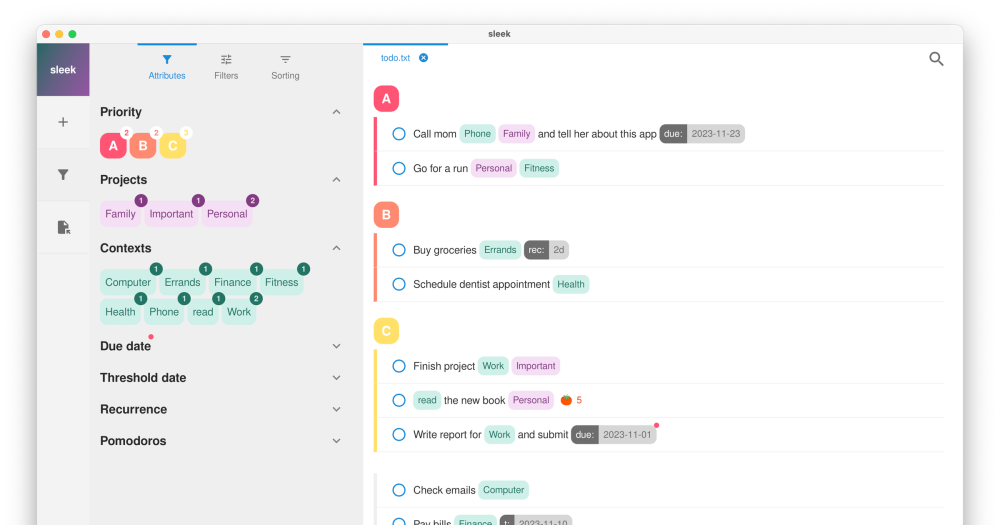
Manage todo.txt tasks on Linux, macOS and Windows with filtering, full-text search, and automatic file watching.

Visit websiteGitHub2.1K stars
Image for Sleek
TL;DR

Sleek is a cross-platform todo.txt manager for Linux, macOS and Windows that brings the plain-text task format to a polished desktop GUI. It is a local-first open source alternative to cloud task managers like Microsoft To-Do and SwiftoDo, writing to files you own rather than vendor accounts. MIT licensed, free to download, with no subscription required. Best for privacy-focused individuals and developers who want filtering, full-text search, and automatic sync with other todo.txt apps.

Read the full breakdownHide the full breakdownWho it is for, how it works, trade-offs, the quick start and the FAQ
who it's for

Who Sleek is for#

Developers who use todo.txt across multiple platforms

Sleek fits a file-based workflow where the same todo.txt file is opened by a desktop GUI, a CLI tool, and a mobile app without a central server. File watching ensures changes from any of these appear in Sleek immediately.

Skip if:

You need a task manager that integrates with project management tools like Jira, Linear, or GitHub Issues. Sleek is a plain-text manager with no API integrations.

Privacy-focused individuals migrating from cloud task managers

Users leaving Microsoft To-Do or other cloud-based task managers get immediate local ownership of their tasks. Sleek requires no account, sends no data to any server, and stores everything in a file you can back up, version-control, or move at any time.

Skip if:

You need collaboration features such as shared tasks, assignments, or comments. Sleek is a single-user desktop application.

Users who want a GUI over the todo.txt CLI

The todo.txt command-line interface is powerful but offers no filtering UI, no grouping, and no file watching. Sleek gives the same file format a visual layer with real-time filtering, grouping, and search, while remaining fully compatible with the CLI and other todo.txt tools.

Skip if:

You are comfortable with the command-line interface and do not need a GUI. The todo.txt CLI is lighter and scriptable.

Teams using local-first file sync (Syncthing, Nextcloud)

If your team already uses Syncthing or Nextcloud to synchronize files, adding Sleek requires no new infrastructure. Each team member runs Sleek against a shared synced folder, and file watching propagates changes across all instances.

Skip if:

Your team needs real-time collaboration, shared projects with assignments, or comment threads. Those features require a dedicated project management tool, not a plain-text file manager.

the problem

The problem it solves#

Cloud-based todo apps tie your tasks to a vendor's servers. When a service changes pricing, restricts export, or shuts down, your data goes with it. Microsoft To-Do, one of the most widely used free task managers, is retiring on June 30, 2027, leaving its users searching for an alternative.

The todo.txt format addresses this by storing tasks as plain text in a file you own and can open with any text editor. Most todo.txt tools are mobile apps or command-line interfaces; few offer a cross-platform desktop GUI that handles filtering, grouping, and full-text search.

how Sleek solves it

How it solves it#

Tag-based filtering and custom grouping

Filter tasks by any attribute in the todo.txt format: contexts (@context), projects (+project), priorities, due dates, threshold dates, or custom key-value pairs. Grouping is fully configurable, so you can organize tasks by any combination of these attributes. Tandem filtering and grouping covers most common task-triage workflows without leaving the keyboard.

Smart full-text search

Search the contents of all open todo.txt files simultaneously. Results update live as you type, covering both complete and incomplete tasks. The search runs locally against the files on disk, so there is no cloud index and no query limit.

Automatic file watching

Sleek continuously monitors all open todo.txt files for external changes. If a mobile app, CLI tool, or any other program modifies the file, the desktop view updates immediately without a manual refresh. This makes it practical to use alongside todo.txt apps on other platforms without a dedicated sync protocol.

Repeating todos and due dates

Create tasks that recur on a daily, weekly, monthly, or custom schedule using the standard rec: extension. Due dates (due:YYYY-MM-DD) and threshold dates (t:YYYY-MM-DD) are supported as first-class attributes, with filtering and grouping by both values.

Completed todo archiving

Completed tasks can be hidden or archived into a separate done.txt file, keeping the active task list focused. The standard todo.txt format means any archived done.txt file is immediately readable by other todo.txt-compatible apps or plain text editors.

strengths · trade-offs

Strengths and trade-offs#

Strengths

  • MIT license, free to downloadSleek is MIT licensed and free to download from GitHub Releases, Homebrew, Snap, Flathub, and the AUR. No subscription, no account required, no plan tiers. The MIT license also means you can fork, modify, and redistribute it without restriction, including for commercial purposes.
  • Works with any todo.txt ecosystemBecause Sleek uses the standard todo.txt format, its files are immediately readable by every other todo.txt-compatible app: SwiftoDo on iOS, SimpleTask on Android, the todotxt CLI, and dozens of other clients. The file-watching feature keeps all of these in sync through shared files, not through a proprietary sync layer.
  • Active cross-platform development since 2020Sleek has been in development since October 2020, with the last commit on 2026-11-17. It ships through multiple distribution channels: Homebrew, Snap, Flathub, AUR, the Mac App Store, and the Microsoft Store. Multiple-language support and regular updates across all three platforms indicate sustained maintenance.

Trade-offs

  • -No built-in sync between devicesSleek reads and writes local files directly with no cloud sync layer. If you work across multiple machines, you need a file sync tool (Syncthing, Nextcloud, or similar) set up independently. This is a deliberate trade-off for local-first file ownership, but it adds a setup step that cloud task managers handle automatically.
  • -No mobile appSleek is a desktop application only. Mobile access to the same todo.txt file requires a separate app. The file-watching feature means mobile changes appear in Sleek as soon as the file syncs, but there is no Sleek mobile client and none is listed in the project roadmap.
  • -Growing backlog with limited contributor capacityThe project has 35 open issues and the maintainer has noted the backlog is growing while contribution capacity is limited. Users who encounter bugs in Sleek's filtering or archive behavior may face slow fixes. The project is seeking contributors with React, TypeScript, Electron, Vitest, or Playwright skills.
versus alternatives

Sleek vs alternatives#

Sleek vs Microsoft To-Do

Microsoft To-Do and Sleek both manage personal task lists, but they represent opposite architectural choices. Microsoft To-Do is cloud-based and stores tasks on Microsoft's servers; Sleek writes to local files you own. Microsoft To-Do retires on June 30, 2027, making any long-term investment in it a poor bet.

FeatureSleekMicrosoft To-Do
LicenseMITProprietary
Data storageLocal filesMicrosoft cloud
Self-hostingFile-based, no serverNone
Formattodo.txt (open standard)Proprietary
PlatformsLinux, macOS, WindowsWindows, iOS, Android, web
PriceFreeFree until retirement

Sleek is the right choice for users who want their tasks in a file they own, can back up, and can open with any editor. The file-watching feature means changes from other todo.txt apps appear in Sleek immediately, with no account or sync service required.

Sleek vs SwiftoDo

SwiftoDo is a native Mac and iOS app built exclusively for the todo.txt format with full sorting and filtering. It offers a polished native experience on Apple platforms. The key distinction is platform coverage: SwiftoDo runs on macOS and iOS only, while Sleek runs on Linux and Windows as well.

FeatureSleekSwiftoDo
LicenseMITProprietary
PlatformsLinux, macOS, WindowsmacOS, iOS
File formattodo.txttodo.txt
PriceFreePaid
Mobile supportNone (desktop only)iOS native

Sleek is the better choice when Linux or Windows is in the picture, or when cost is a factor. SwiftoDo is worth considering if you work exclusively on Apple hardware and want a native macOS and iOS app with deep platform integration.

install · quick start

Quick start#

bash
Install Sleek on macOS via Homebrew, or download signed installers for Windows and Linux from https://github.com/ransome1/sleek/releases/latest

```bash
brew install --cask sleek-app
```
tech stack · detected from GitHub

What it's built on#

Languages
TypeScript
Frameworks
ElectronReact
frequently asked

FAQ#

Does Sleek sync tasks across devices?

Not natively. Sleek reads and writes local files and has no built-in sync. To use the same todo.txt file on multiple machines, put the file in a synced folder (Syncthing, Nextcloud, Dropbox, or similar). Sleek's file-watching feature picks up any external changes and updates the view automatically once the file syncs.

Is Sleek available for iPhone or Android?

No. Sleek is a desktop application for Linux, macOS and Windows only. For mobile, any todo.txt-compatible app works with the same files. SwiftoDo is a popular choice on iOS and iPadOS; SimpleTask is available on Android. Sleek's file-watching feature means changes from these mobile apps appear on the desktop as soon as the shared file syncs.

What is the todo.txt format?

Todo.txt is a plain-text task format where each task is one line in a .txt file. It supports priorities (A), completion markers (x), contexts (@home, @work), projects (+project), due dates (due:2026-12-01), threshold dates (t:2026-11-25), and key-value extensions including recurring tasks (rec:1w). The format is open and readable by any text editor or any todo.txt-compatible app.

What happened to Microsoft To-Do? Can I migrate to Sleek?

Microsoft To-Do retires on June 30, 2027. Users should plan their migration before that date. Sleek and the todo.txt ecosystem offer a local-first alternative where tasks live in files you own, not in a vendor's cloud. Creating a new todo.txt file and entering your tasks gives you a fresh start with full local ownership.

Can Sleek handle repeating tasks?

Yes. Sleek supports repeating todos using the rec: extension (for example, rec:1w for weekly or rec:1m for monthly). When you mark a repeating task complete, Sleek creates the next instance automatically based on the interval. Due dates (due:YYYY-MM-DD) and threshold dates (t:YYYY-MM-DD) are also fully supported, with filtering and grouping by both values.

also worth a look

Similar open-source tools#

Errands

Alternative toMicrosoft To-Do

GNOME task manager with CalDAV sync and recurrent tasks.

  • 532 GitHub stars
  • ZlibLicence Zlib

Taskwarrior

Alternative toMicrosoft To-Do

Command-line task manager with GTD workflows and local storage.

  • 6,176 GitHub stars
  • MITLicence MIT

Tududi

Alternative toMicrosoft To-Do

Self-hosted life manager with AI day planning and MCP server.

  • 3,572 GitHub stars
  • MITLicence MIT

Donetick

Alternative toMicrosoft To-Do

Shared chore and task manager with rotation and NFC triggers

  • 2,766 GitHub stars
  • AGPL-3.0Licence AGPL-3.0

Tasks.org

Alternative toMicrosoft To-Do

GPL-licensed Android to-do app with CalDAV and self-hosted sync

  • 5,784 GitHub stars
  • GPL-3.0Licence GPL-3.0

Super Productivity

Alternative toMicrosoft To-Do

Offline-first task manager with time tracking and dev integrations

  • 23,913 GitHub stars
  • MITLicence MIT
by category

Open source tools in these categories#

325

Business & Productivity

OpenClaw, Excalidraw, RustDesk
134

Product & Project Management

freeCodeCamp, agency-agents, Gstack

Sponsors

SnitchFeed

Live monitoring on LinkedIn, X, Reddit & more. Agentic social listening for startups.

Marketing & Growth

Windshift

Alternative toJira

Self-hosted work management for teams leaving Jira

  • 460 GitHub stars
  • AGPL-3.0Licence AGPL-3.0

Nuphos

Alternative toConductor

Agent workspace for teams running Claude Code or Codex

  • 707 GitHub stars
  • Apache-2.0Licence Apache-2.0
  • #AI Agents
Advertise your product

New open source projects by email

The projects we add and every new guide. Free, unsubscribe any time.

Find open source alternatives to paid software

/
  • Claude Code to OpenCode
  • Jira to Windshift
  • Notion to AppFlowy
  • Slack to Mattermost
  • Linear to GitLab
  • Wispr Flow to Handy
  • Arc to Zen Browser
  • CapCut to Concat
  • Grok Bot to rakazo
  • Superhuman to Inbox Zero
  • Discord to Stoat
  • Airtable to AITable
  • Datadog to SigNoz
  • Muse to OpenClaw
  • Railway to Coolify
  • GitHub Copilot to Cline
  • Confluence to Wiki.js
  • Microsoft Teams to Rocket.Chat
  • 1Password to KeePassXC
  • Firebase to Supabase
  • Pinecone to Qdrant
  • Zapier to n8n
  • Devin AI to OpenHands
  • Adobe Premiere Pro to Shotcut
  • Claude Code to OpenCode
  • Jira to Windshift
  • Notion to AppFlowy
  • Slack to Mattermost
  • Linear to GitLab
  • Wispr Flow to Handy
  • Arc to Zen Browser
  • CapCut to Concat
  • Grok Bot to rakazo
  • Superhuman to Inbox Zero
  • Discord to Stoat
  • Airtable to AITable
  • Datadog to SigNoz
  • Muse to OpenClaw
  • Railway to Coolify
  • GitHub Copilot to Cline
  • Confluence to Wiki.js
  • Microsoft Teams to Rocket.Chat
  • 1Password to KeePassXC
  • Firebase to Supabase
  • Pinecone to Qdrant
  • Zapier to n8n
  • Devin AI to OpenHands
  • Adobe Premiere Pro to Shotcut