Open Source Alternatives
  • Alternatives
  • Categories
    Categories by size1,283 projects
    • Developer Tools660
    • AI & Machine Learning543
    • Business & Productivity307
    • Web Development219
    • Security & Monitoring198
    • Communication & Collaboration168
    • IT Management164
    • Design & Creative142
    • LLMOps & AI Tooling140
    • DevOps & CI/CD137
    Browse all 21 categoriesCloud & Hosting, Product & Project Management and 9 more
  • Blog
  • Advertise
SearchNotion, Slack, password manager.../
Submit
Open Source Alternatives
  • Alternatives
    • Developer Tools660
    • AI & Machine Learning543
    • Business & Productivity307
    • Web Development219
    • Security & Monitoring198
    • Communication & Collaboration168
    • Browse all 21 categories
  • Blog
  • Advertise
Submit your project

New open source projects by email

The projects we add and every new guide. Free, unsubscribe any time.

Open Source Alternatives LogoOpen Source Alternatives

Handpicked Open Source Alternatives to Paid Softwares

Add Open Source Alternatives as a preferred source on Google

Product

  • Categories
  • Tag
  • Advertise

Resources

  • Blog
  • Collection
  • Submit

Company

  • Privacy Policy
  • Terms of Service
  • Refund Policy
  • Sitemap

Alternatives

  • Claude Code
  • Jira
  • Notion
  • Slack
  • Linear
  • Wispr Flow
  • All alternatives
© 2026 Open Source Alternatives. All rights reserved.
Open SourceAlternatives
Home/Categories/Developer Tools/Spacebin
icon of Spacebin

Spacebin

Open source alternative to Pastebin.com

  • 158 stars
  • Apache-2.0
  • Active this week
  • Last commit today

Last verified Nov 17, 2026

Host a private pastebin server with server-side syntax highlighting, encrypted pastes, collections, and SQLite/MySQL/PostgreSQL support.

Visit websiteGitHub158 starsDeploy on Hostinger
Image for Spacebin
TL;DR

Spacebin is a self-hosted pastebin server written in Go, built as an open source alternative to Pastebin.com and other commercial text-sharing services. It runs on SQLite, MySQL, or PostgreSQL, deploys via a single Docker container, and handles syntax highlighting server-side so the interface works without JavaScript. Browser-side AES-256-GCM encryption keeps password-protected pastes private from the server itself. Best for developers, home-lab users, and teams who want their code snippets and notes on their own infrastructure rather than a third-party service.

Read the full breakdownHide the full breakdownWho it is for, how it works, trade-offs, the quick start and the FAQ
who it's for

Who Spacebin is for#

Developers sharing code snippets on a private network

Deploy Spacebin on an internal server or home lab to share code, configs, and notes with colleagues without sending content to a public service. Configurable rate limits and document expiration let you tune the instance for your team's volume and retention needs.

Skip if:

If your team already shares snippets through GitHub Gists, a wiki, or a tool like Notion, adding a separate pastebin server adds maintenance overhead without clear gain.

Home-lab and self-hosting enthusiasts

The SQLite backend and single Docker command make Spacebin one of the lower-friction self-hosted tools to get running. It suits a personal instance with no external database server, and the public instance at spaceb.in lets you test the interface before deploying.

Skip if:

If you have no server infrastructure or prefer zero-maintenance tools, the hosted instance at spaceb.in removes the deployment step entirely.

Teams in air-gapped or high-privacy environments

For development environments with no outbound internet access, or for teams with strict data policies about where code and configuration live, Spacebin can run entirely on internal infrastructure. Browser-encrypted pastes add a second layer for content that should not be readable even by the server operator.

Skip if:

If your environment requires a commercial support contract or audit-grade access logs, a managed service with formal SLAs is a better fit.

the problem

The problem it solves#

Most public pastebin services store your content on shared infrastructure with minimal privacy guarantees. Pastes may be indexed by search engines, retained indefinitely under a service's terms, and read by the operator. For developers sharing config snippets, teams exchanging internal notes, or anyone pasting text that should not live on a third-party server, there is no straightforward private option that is also easy to deploy.

The service you depend on can change its terms, rate-limit access, run ads against your content, or simply shut down. Having your own pastebin instance removes those dependencies entirely.

how Spacebin solves it

How it solves it#

Server-side syntax highlighting

Spacebin highlights code on the server, so syntax coloring works in any browser regardless of JavaScript settings. The interface renders correctly with JavaScript disabled, which the README describes as a deliberate design choice that most pastebin tools do not support.

Browser-encrypted pastes

Password-protected pastes are encrypted in the browser using AES-256-GCM before upload. The key is derived with PBKDF2-SHA256 (600,000 iterations by default, up to 2,000,000). The server stores only the encrypted envelope, so neither the server operator nor anyone with database access can read the plaintext.

Paste collections

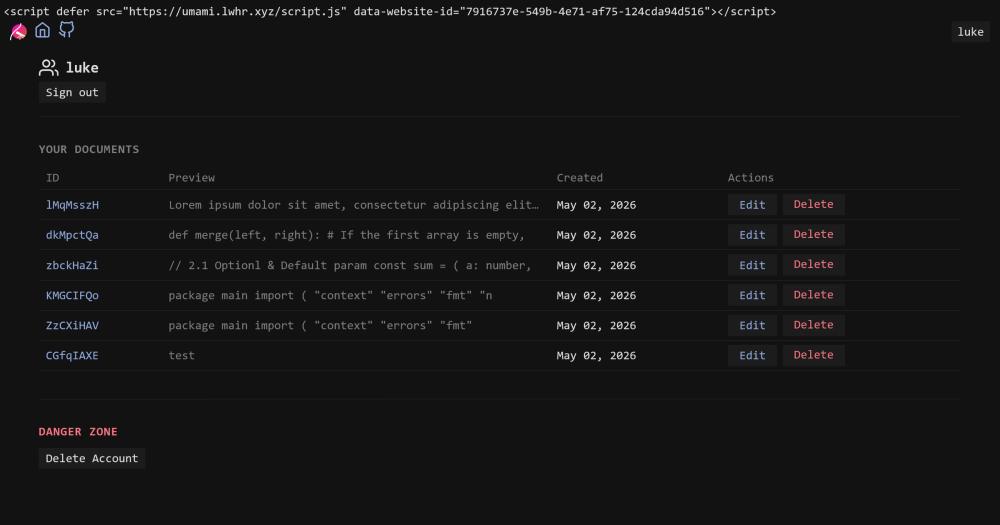
Group several documents under one link, with a tab per document and an optional title. Collections are viewable at /c/{collection}. If you are signed in, the collection appears on your account page and can be deleted without removing the underlying documents.

Three database backends

Runs on SQLite, MySQL, or PostgreSQL, configured via a single SPIRIT_CONNECTION_URI environment variable. SQLite requires no separate server and suits personal instances. MySQL and PostgreSQL handle concurrent writes for team deployments.

REST API and curl compatibility

The API accepts JSON and multipart/form-data, so you can upload a file or string with curl and extract the document ID using jq. Routes cover document creation, retrieval, raw text, and collection management with no special client required.

strengths · trade-offs

Strengths and trade-offs#

Strengths

  • Apache-2.0 license with no network copyleftApache-2.0 is an OSI-approved permissive license. You can run Spacebin commercially, modify the source, and deploy it as a service without publishing your changes. Unlike AGPL-licensed alternatives, there is no network copyleft clause requiring source disclosure when you run a modified version.
  • Minimal deployment footprintThe README describes the server as 99% self-contained: one binary plus a database. No runtime dependencies, no asset compilation step, and no separate background workers. The Docker image packages this into a single container command.
  • Interface works without JavaScriptCore functionality including paste creation, retrieval, and syntax highlighting works with JavaScript disabled. Only encrypted pastes require it, since the cryptographic operations run in the browser. The README notes this as a deliberate architectural choice, not a fallback.

Trade-offs

  • -Environment variable prefix changes in next major versionAll configuration variables currently use the SPIRIT_ prefix. The README notes this will change to SPACEBIN_ in the next major version. Existing deployments will need a configuration update on upgrade, and any scripts, Docker Compose files, or Kubernetes configs that reference SPIRIT_ variables will break until updated.
  • -Small contributor baseThe repository has 158 stars and 18 forks. Community support runs through GitHub Discussions. A small contributor base means feature requests and non-critical bugs may move slowly compared to larger self-hosted projects with dedicated maintainer teams.
  • -Encrypted pastes lose syntax highlighting and edit supportBecause the server stores only the encrypted envelope for password-protected pastes, server-side syntax highlighting and document editing are unavailable for those documents. This is a deliberate constraint stated in the README, and the lock icon is hidden on non-HTTPS instances since browsers require a secure context for the Web Crypto API.
versus alternatives

Spacebin vs alternatives#

Spacebin vs Pastebin.com

Both tools serve the same core use case: sharing text, code, or notes through a URL. The difference is deployment model and data ownership. Spacebin runs on your own infrastructure; Pastebin.com is a managed public service with no self-hosting option.

FeatureSpacebinPastebin.com
DeploymentSelf-hostedCloud-only
LicenseApache-2.0Proprietary
Encrypted pastesYes, AES-256-GCMNo
Syntax highlightingYes, server-sideYes
Works without JavaScriptYes (except encrypted pastes)No
Paste collectionsYesNo
ExpirationConfigurableFixed options
CostFree to self-hostAd-supported free tier

Spacebin is the better fit when privacy, data ownership, or offline and intranet use matters. Browser-side encryption means even the server operator cannot read password-protected pastes, which Pastebin.com does not offer. The Apache-2.0 license lets you run it commercially and modify it freely. Teams running internal tooling or private development environments benefit from configurable rate limits and expiration without dependence on a third-party service.

Pastebin.com is still a reasonable choice when you need zero setup and want to share content with people who expect a well-known, publicly accessible link. If you are sending a quick snippet to someone outside your organization who cannot reach a private server, or if you have no infrastructure to run a self-hosted service, Pastebin.com's public accessibility is a practical advantage. It also carries no server maintenance overhead.

install · quick start

Quick start#

bash
Deploy Spacebin with Docker using an environment variable for the database connection.

```bash
sudo docker pull spacebinorg/spacebin
sudo docker run -d -e SPIRIT_CONNECTION_URI="sqlite://database.sqlite" -p 80:9000 spacebinorg/spacebin
```
tech stack · detected from GitHub

What it's built on#

Languages
GoJavaScript
Databases
PostgreSQL
frequently asked

FAQ#

Can I use Spacebin without setting up a separate database server?

Yes. Spacebin supports SQLite with the connection URI sqlite://database.sqlite. This runs the database as a local file alongside the server, with no separate database process required. SQLite suits personal instances or low-traffic deployments; switch to PostgreSQL or MySQL for concurrent-write workloads or if you need external database backups.

How are encrypted pastes protected?

Encrypted pastes are processed entirely in the browser. When you set a password, the browser derives a key using PBKDF2-SHA256 (600,000 iterations by default, up to 2,000,000) and encrypts the content with AES-256-GCM before it is sent to the server. The server stores only the encrypted envelope: neither the server operator nor anyone with database access can read the original text. If you lose the password, the content is unrecoverable.

Does Spacebin work with JavaScript disabled?

Most of the interface works without JavaScript: paste creation, retrieval, and syntax highlighting all run server-side. The exception is encrypted pastes, which require JavaScript for the in-browser cryptographic operations. The README notes this is a deliberate design choice. The lock icon for creating encrypted pastes is hidden on non-HTTPS instances, since browsers require a secure context for the Web Crypto API.

What license does Spacebin use?

Spacebin is licensed under Apache-2.0, an OSI-approved permissive license. You can use it for personal or commercial purposes, modify the source, and run it as a service without publishing your changes. The only requirement is retaining the license notice in distributions.

Can I restrict access to my Spacebin instance?

Yes. Setting the SPIRIT_USERNAME and SPIRIT_PASSWORD environment variables enables HTTP Basic Auth on the entire instance. Only requests with the correct credentials will be served. You can also set SPIRIT_HEADLESS=true to disable the web interface and serve only the API, or use SPIRIT_RATELIMITER to control requests per client IP address.

also worth a look

Similar open-source tools#

Svelte

InWeb Development

Compiler-based UI framework with no runtime overhead.

  • 89,015 GitHub stars
  • MITLicence MIT

SeleniumBase

Alternative toBrowserStack

Python browser testing framework with stealth and pytest built in.

  • 13,260 GitHub stars
  • MITLicence MIT

Modern Web Guidance Src

InDeveloper Tools

Modern web platform skills for AI coding agents

  • 6,087 GitHub stars
  • Apache-2.0Licence Apache-2.0

Ant Design Vue

Alternative toKendo UI for Vue

Vue component library for enterprise apps, based on Ant Design.

  • 21,716 GitHub stars
  • MITLicence MIT

Rockxy

Alternative toProxyman

Open-source HTTP/HTTPS debugger for macOS apps, devices, and AI APIs

  • 1,498 GitHub stars
  • AGPL-3.0Licence AGPL-3.0

Astryx

Alternative toMUI X

Agent-ready React design system with 150+ accessible components.

  • 27,480 GitHub stars
  • MITLicence MIT
by category

Open source tools in these categories#

660

Developer Tools

REA (Reverse Engineer Anything), Skills for Real Engineers, superpowers
219

Web Development

freeCodeCamp, Skills for Real Engineers, superpowers
Hostinger

Self-host Spacebin on a Hostinger VPS

Keep it running 24/7, even when your laptop is off. A Hostinger VPS gives it a server of its own.

  1. 01

    Choose a plan

    Starts from $6.49/mo

  2. 02

    Apply

    Extra 10% off yearly plans

  3. 03

    Install Spacebin

    On a server that stays on

  4. 04

    Start building

    Focus on the app, not the server

Deploy on Hostinger

Sponsors

Inbox Zero

Alternative toSuperhuman

AI email assistant that drafts replies and clears your inbox

  • 13,025 GitHub stars
  • AGPL-3.0Licence AGPL-3.0
  • #Email

rakazo

Alternative toGrok Bot

AI teammates you own: your keys, your model, your machine.

  • 8,291 GitHub stars
  • Apache-2.0Licence Apache-2.0
  • #AI Agents

SnitchFeed

Live monitoring on LinkedIn, X, Reddit & more. Agentic social listening for startups.

Marketing & Growth

Advertise your product

New open source projects by email

The projects we add and every new guide. Free, unsubscribe any time.

Find open source alternatives to paid software

/
  • Claude Code to OpenCode
  • Jira to Windshift
  • Notion to AppFlowy
  • Slack to Mattermost
  • Linear to GitLab
  • Wispr Flow to Handy
  • Arc to Zen Browser
  • CapCut to Concat
  • Grok Bot to rakazo
  • Superhuman to Inbox Zero
  • Discord to Stoat
  • Airtable to AITable
  • Datadog to SigNoz
  • Muse to OpenClaw
  • Railway to Coolify
  • GitHub Copilot to Cline
  • Confluence to Wiki.js
  • Microsoft Teams to Rocket.Chat
  • 1Password to KeePassXC
  • Firebase to Supabase
  • Pinecone to Qdrant
  • Zapier to n8n
  • Devin AI to OpenHands
  • Asana to Leantime
  • Claude Code to OpenCode
  • Jira to Windshift
  • Notion to AppFlowy
  • Slack to Mattermost
  • Linear to GitLab
  • Wispr Flow to Handy
  • Arc to Zen Browser
  • CapCut to Concat
  • Grok Bot to rakazo
  • Superhuman to Inbox Zero
  • Discord to Stoat
  • Airtable to AITable
  • Datadog to SigNoz
  • Muse to OpenClaw
  • Railway to Coolify
  • GitHub Copilot to Cline
  • Confluence to Wiki.js
  • Microsoft Teams to Rocket.Chat
  • 1Password to KeePassXC
  • Firebase to Supabase
  • Pinecone to Qdrant
  • Zapier to n8n
  • Devin AI to OpenHands
  • Asana to Leantime